Introduction to TCP/IP
Network Protocol
| Protocol Characteristic | Description |
| Message format | When a message is sent, it must use a specific format or structure. Message formats depend on the type of message and the channel that is used to deliver the message. |
| Message size | The rules that govern the size of the pieces communicated across the network are very strict. They can also be different, depending on the channel used. When a long message is sent from one host to another over a network, it may be necessary to break the message into smaller pieces in order to ensure that the message can be delivered reliably. |
| Timing | Many network communication functions are dependent on timing. Timing determines the speed at which the bits are transmitted across the network. It also affects when an individual host can send data and the total amount of data that can be sent in any one transmission. |
| Encapsulation | Each message transmitted on a network must include a header that contains addressing information that identifies the source and destination hosts, otherwise it cannot be delivered. Encapsulation is the process of adding this information to the pieces of data that make up the message. In addition to addressing, there may be other information in the header that ensures that the message is delivered to the correct application on the destination host. |
| Message pattern | Some messages require an acknowledgment before the next message can be sent. This type of request/response pattern is a common aspect of many networking protocols. However, there are other types of messages that may be simply streamed across the network, without concern as to whether they reach their destination. |
Common Methods of Data Transmission
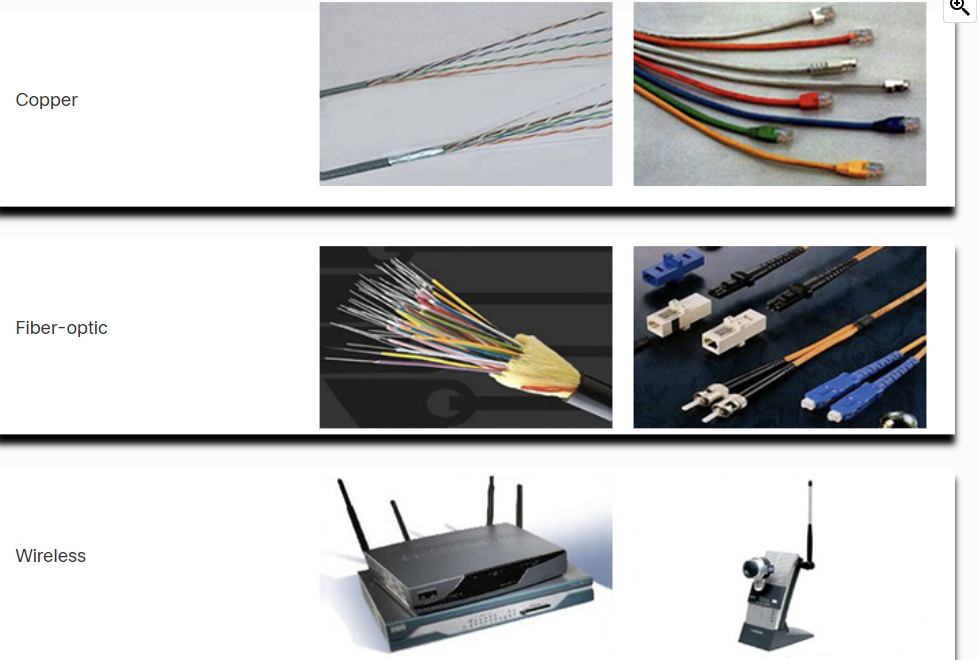
- Electrical signal transmission is achieved by representing data as electrical pulses on copper wire.
- Optical signals: transmission is achieved by converting the electrical signals into light pulses.
- Wireless signal transmission is achieved by using infrared, microwave, or radio waves through the air.
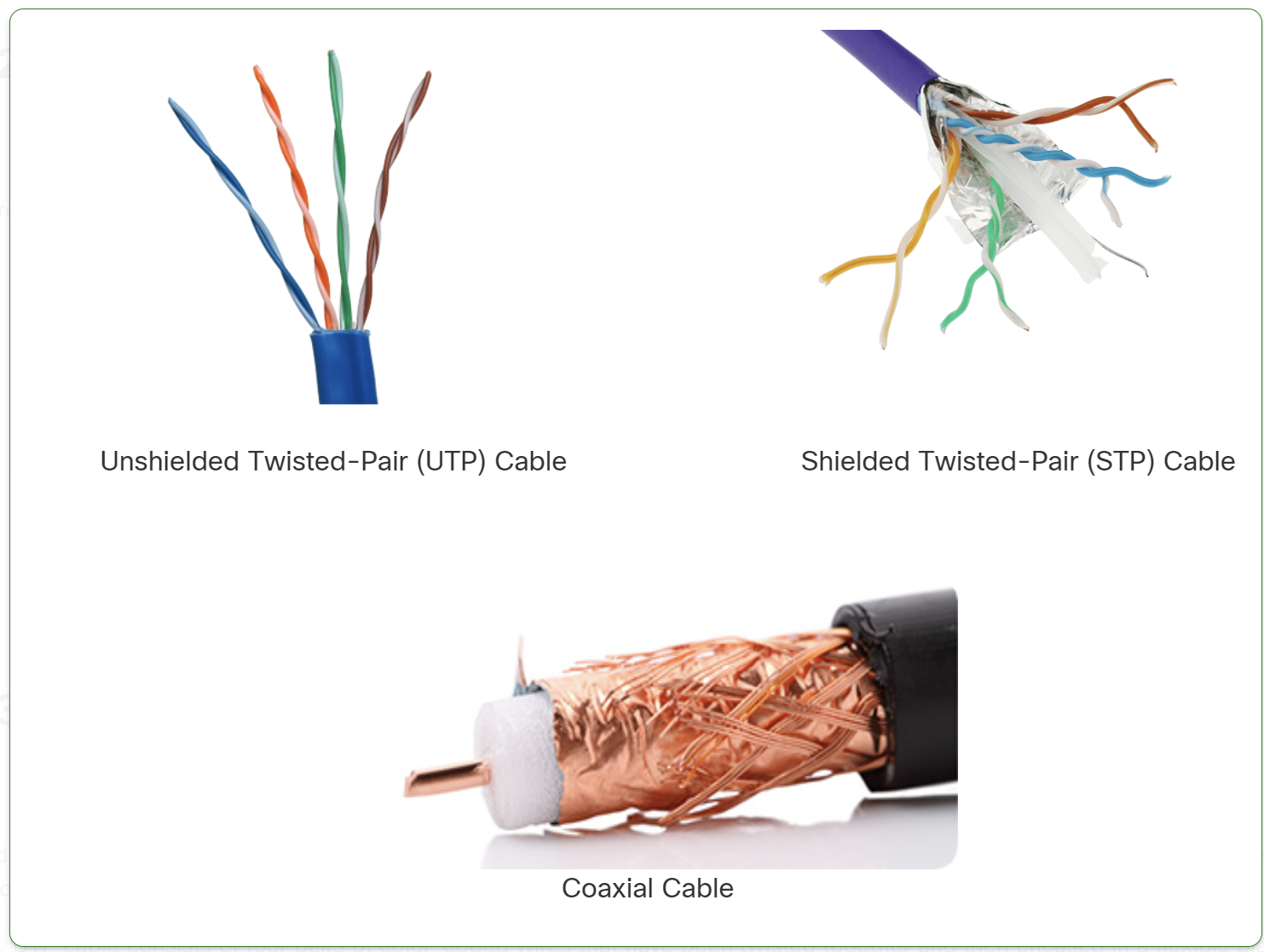
- UTP (Unshielded Twisted Pair): No shielding, cheaper, more flexible, but less resistant to interference. Used in home and office networks.
- STP (Shielded Twisted Pair): Has shielding to reduce interference, but is more expensive and less flexible. Used in industrial or high-EMI environments.
Types of Fiber Optic Cables
- Single-Mode Fiber (SMF)
- Uses a single beam of light (laser).
- Supports long distances (up to 100+ km).
- Higher bandwidth but more expensive.
- Multi-Mode Fiber (MMF)
- Uses multiple beams of light (LED).
- Supports shorter distances (up to 2 km).
- Cheaper but has more signal loss due to modal dispersion
Network Documentation
Network documentation is essential for managing, troubleshooting, and securing a network.
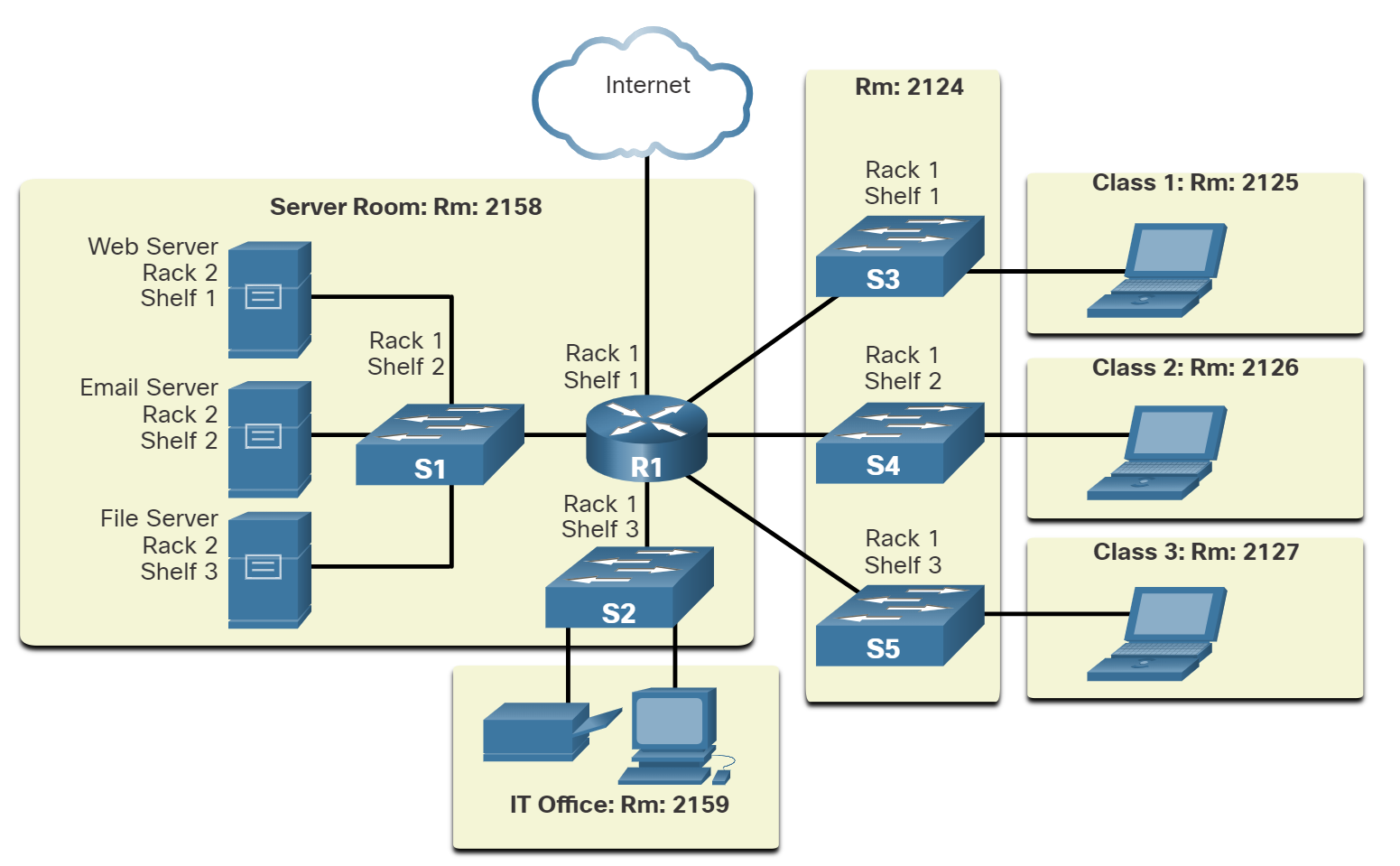
Physical Documentation
Focuses on hardware and cabling layout.
🔹 Includes:
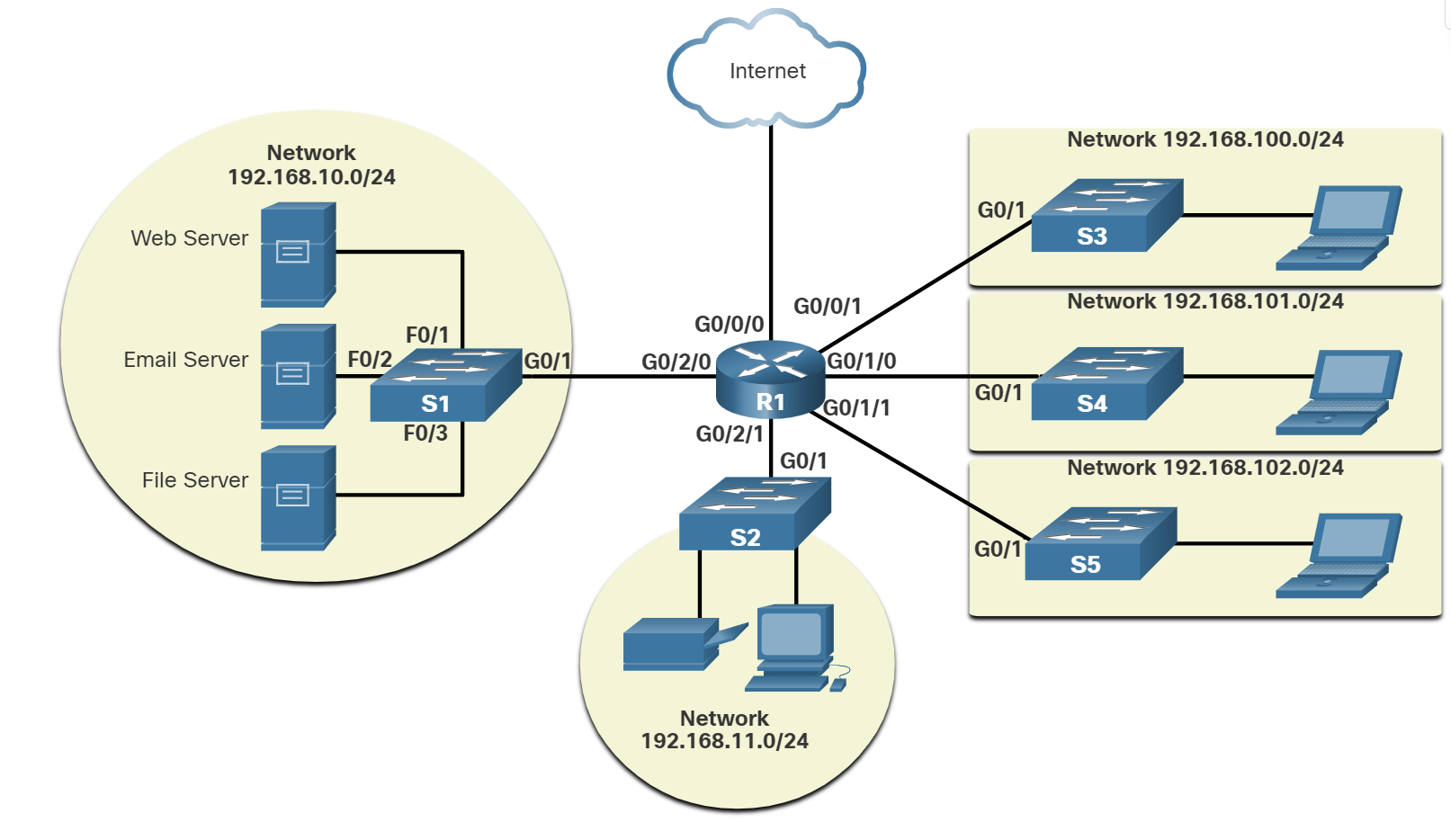
✔ Network topology diagrams (physical)
✔ Rack elevation and cabling layout
✔ Hardware inventory (routers, switches, firewalls)
✔ Power & cooling systems
✅ Used for troubleshooting hardware, expansion planning, and audits.
📌 Logical Documentation
Focuses on data flow and network configurations.
🔹 Includes:
✔ Logical network topology diagrams
✔ IP addressing, VLANs, and routing tables
✔ Security policies and firewall rules
✔ Performance and monitoring reports
✅ Helps in troubleshooting, security management, and network planning.
Bandwidth Vs Throughput
Bandwidth is the capacity of a medium to carry data. Digital bandwidth measures the amount of data that can flow from one place to another in a given amount of time. Bandwidth is typically measured in the number of bits that (theoretically) can be sent across the media in a second. Common bandwidth measurements are as follows:
Thousands of bits per second (Kbps)
Millions of bits per second (Mbps)
Billions of bits per second (Gbps)
Like bandwidth, throughput measures the transfer of bits across the media over a given period. However, due to several factors, throughput does not usually match the specified bandwidth. Many factors influence throughput, including:
- The amount of data being sent and received over the connection.
- The types of data being transmitted.
- The latency is created by the number of network devices encountered between the source and the destination.
Latency refers to the amount of time, including delays, for data to travel from one given point to another.
TCP (Transmission Control Protocol) is a standard protocol that defines how to establish and maintain a network connection through which an application program can exchange data.
The TCP/IP model both defines and references a large collection of protocols that allow computers to communicate.
The name TCP/IP is simply the name of the two most common protocols (TCP and IP) separated by, which means the model refers to the most preferred protocols.
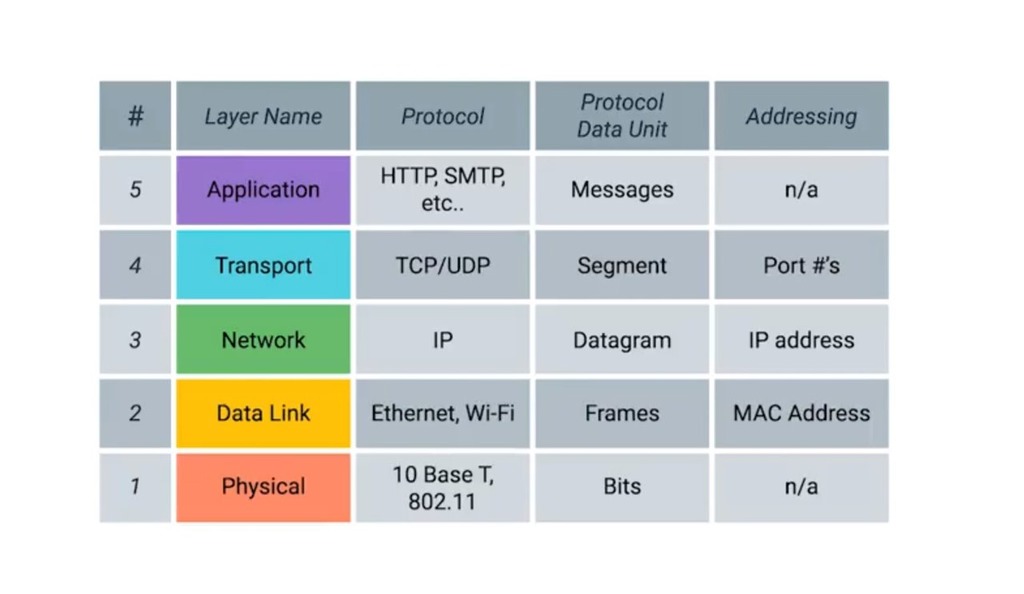
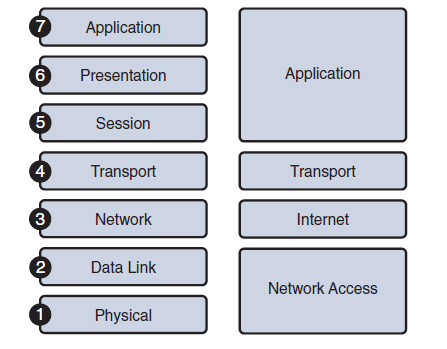
Application Layer: Refers to interfaces between the network and application software. It also includes authentication services.
Note: The application layer does not define the application itself.
Transport Layer: Provides a variety of services between two host computers, including connection establishment and termination, flow control, error recovery, and segmentation of large data blocks into smaller parts for transmission. the two most commonly used transport layer protocols are the Transmission control protocol (TCP) and the user datagram protocol (UDP).
Network: Refers to logical addressing, routing, and path determination.
Data Link: Formats data into frames appropriate for transmission onto some physical medium. Defines rules for when the medium can be used. Defines the means by which to recognize transmission errors.
Physical: Defines the electrical, optical, cabling, connectors, and procedural details required for transmitting bits, represented as some form of energy passing over a physical medium.
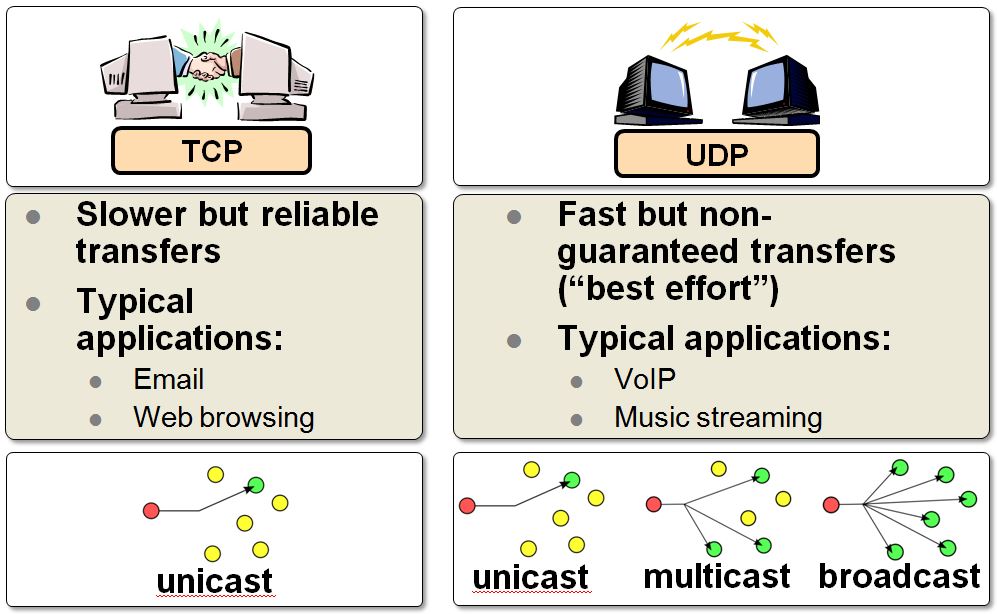
| TCP | UDP | |
| Full form | It stands for Transmission Control Protocol. | It stands for User Datagram Protocol. |
| Type of connection | It is a connection-oriented protocol, which means that the connection needs to be established before the data is transmitted over the network. | It is a connectionless protocol, which means that it sends the data without checking whether the system is ready to receive or not. |
| Reliable | reliable protocol as it provides assurance for the delivery of data packets. | unreliable protocol as it does not take a guarantee for the delivery of packets. |
| Speed | slower than UDP as it performs error checking, flow control, and provides assurance for the delivery of data. | faster than TCP as it does not guarantee the delivery of data packets. |
| Header size | The size of TCP is 20 bytes. | The size of the UDP is 8 bytes. |
| Acknowledgment | TCP uses the three-way handshake concept. In this concept, if the sender receives the ACK, then the sender will send the data. TCP also has the ability to resend the lost data. | UDP does not wait for any acknowledgment; it just sends the data. |
| Flow control mechanism | It follows the flow control mechanism in which too many packets cannot be sent to the receiver at the same time. | This protocol follows no such mechanism. |
| Error checking | TCP performs error checking by using a checksum. When the data is corrected, then the data is retransmitted to the receiver. | It does not perform any error checking, and also does not resend the lost data packets. |
| Applications | This protocol is mainly used where a secure and reliable communication process is required, like military services, web browsing, and e-mail. | This protocol is used where fast communication is required and does not care about reliability like VoIP, game streaming, video and music streaming, etc. |
Which two TCP header fields are used to confirm receipt of data?
- Sequence Number
- Acknowledge number
How does TCP communicate?
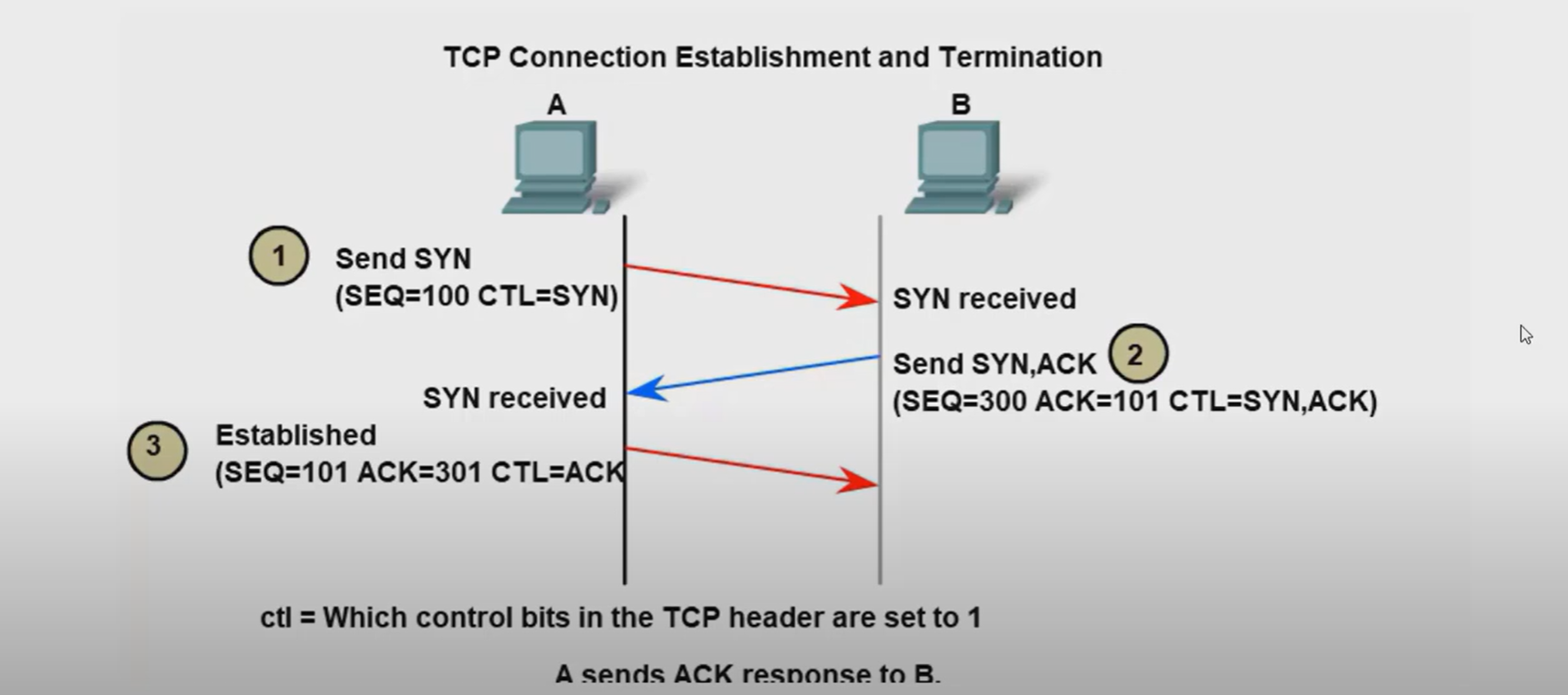
- Three-way handshake.
- SYN, ACK, FIN, RST.
- Windows size (65,535)
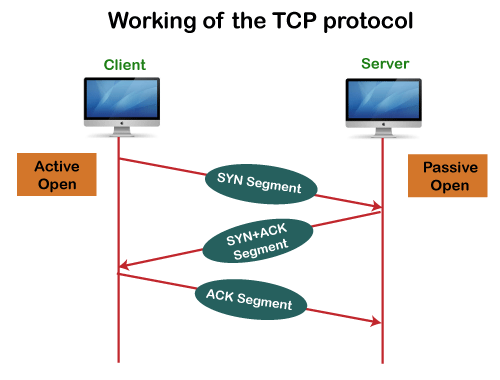
The six control bits flags are as follows:
- SYN: It is used to establish a connection between the hosts.
- ACK: Acknowledgment flag used in connection establishment and session termination. If the ACK is set to 0, then it means that the data packet does not contain an acknowledgement.
- PSH: is a control flag used to indicate that the receiving device should deliver the data to the receiving application as soon as possible, rather than buffering it.
- RST: Reset the connection when an error or timeout occurs.
- URG: It represents an urgent pointer. If it is set, then the data is processed urgently.
- FIN: No more data from sender and used in session termination
When the PSH flag is set, it instructs the receiving device to deliver the data immediately to the application layer without waiting for more data to arrive.
Establish TCP Connection:
Terminate TCP connection:
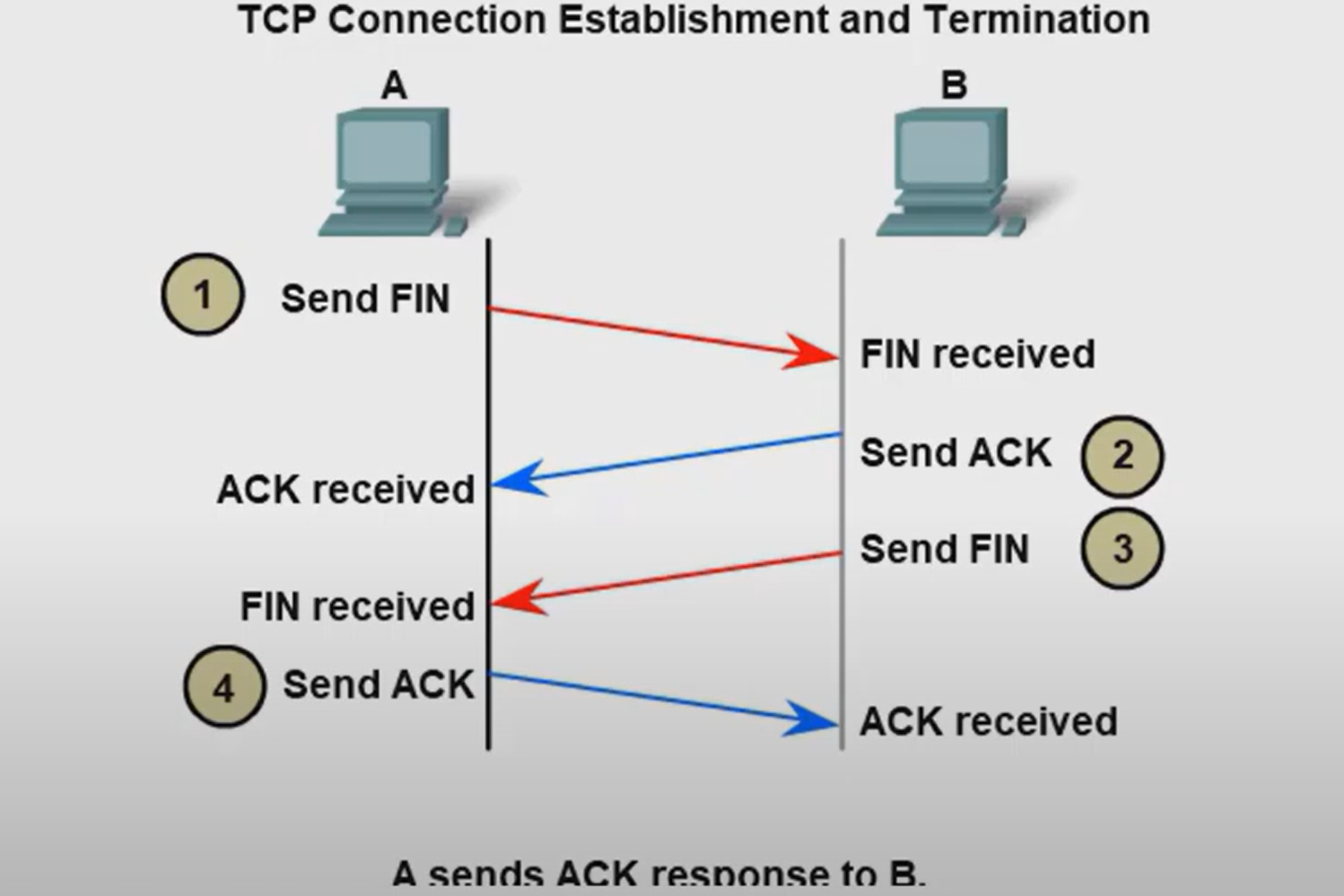
How many exchanges are needed to end both sessions between two hosts?
Four exchanges.
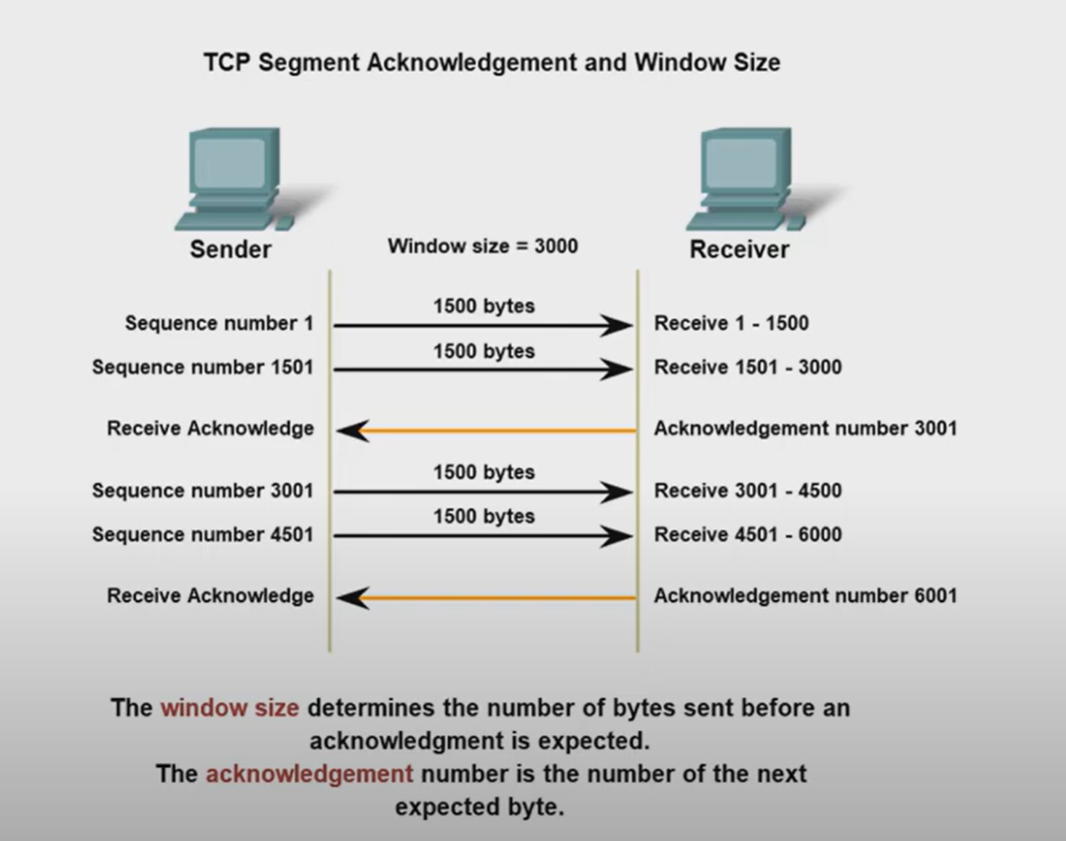
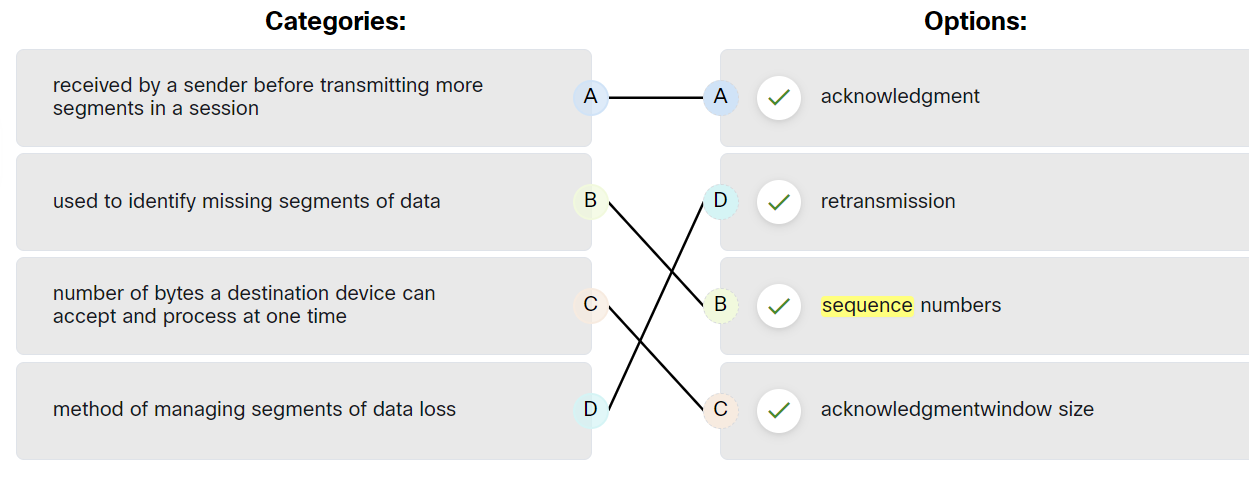
TCP Reliability - Data Loss and Retransmission
The Sequence (SEQ) number and Acknowledge (ACK) number are used together to confirm receipt of the bytes of data contained in the transmitted segments.
- What field is used by the destination host to reassemble segments into the original order? Sequence Number
What field is used to provide flow control? Window Size
Flow control is the amount of data that the destination can receive and process reliably.
- Which field in the TCP header indicates the status of the three-way handshake process? control bits
- Network congestion has resulted in the source learning of the loss of TCP segments that were sent to the destination. What is one way that the TCP protocol addresses this?
The source decreases the amount of data that it transmits before it receives an acknowledgement from the destination
The four fields in the UDP header are as follows:
| Source Port | Identify the source application by port number. |
| Destination Port | Identify the destination application by port number. |
| Length | length of the UDP datagram header |
| Checksum | used for error checking of the datagram header and data |
Ports
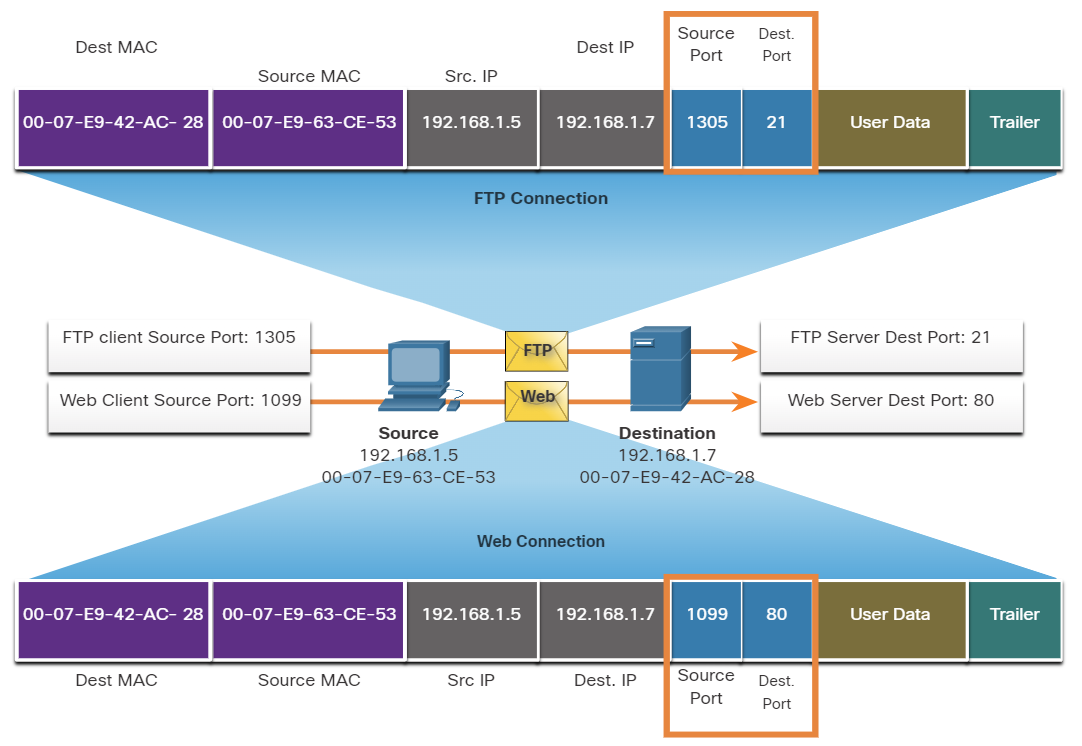
When a message is delivered using either TCP or UDP, the Protocols and services requested are identified by a port number.
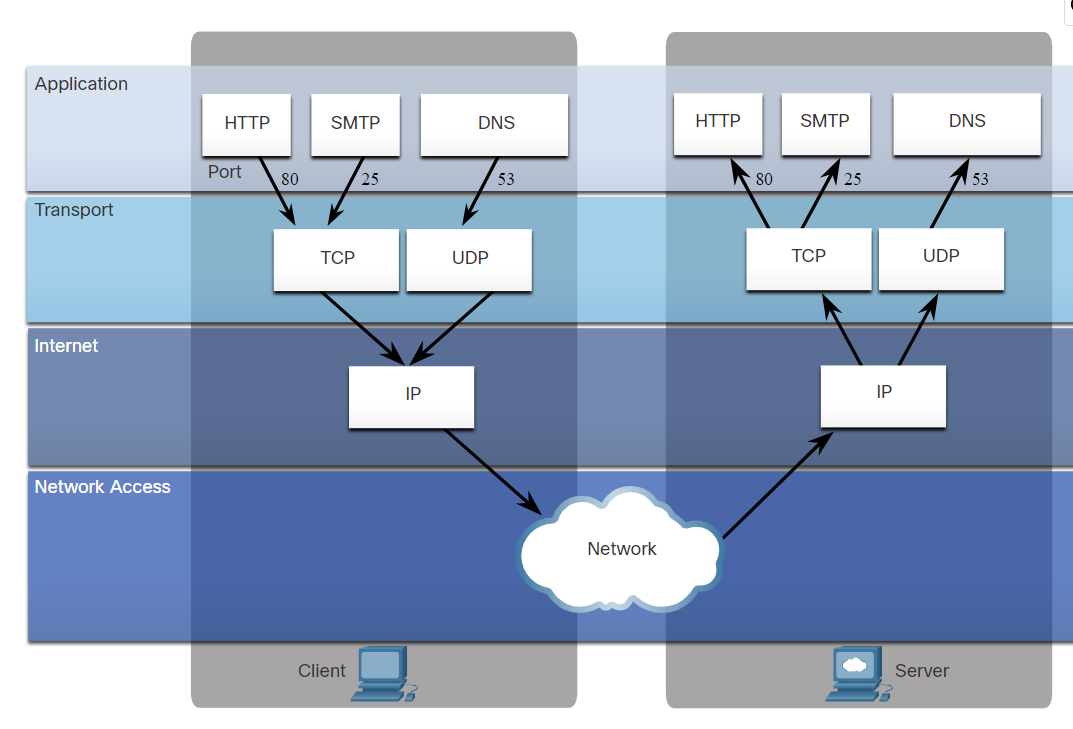
What are well-known ports?
These are standardized ports assigned by IANA (Internet Assigned Numbers Authority) for widely used services and protocols.
- Range: 0 – 1023
- Assigned to common protocols (HTTP, HTTPS, FTP, SSH, DNS, etc.)
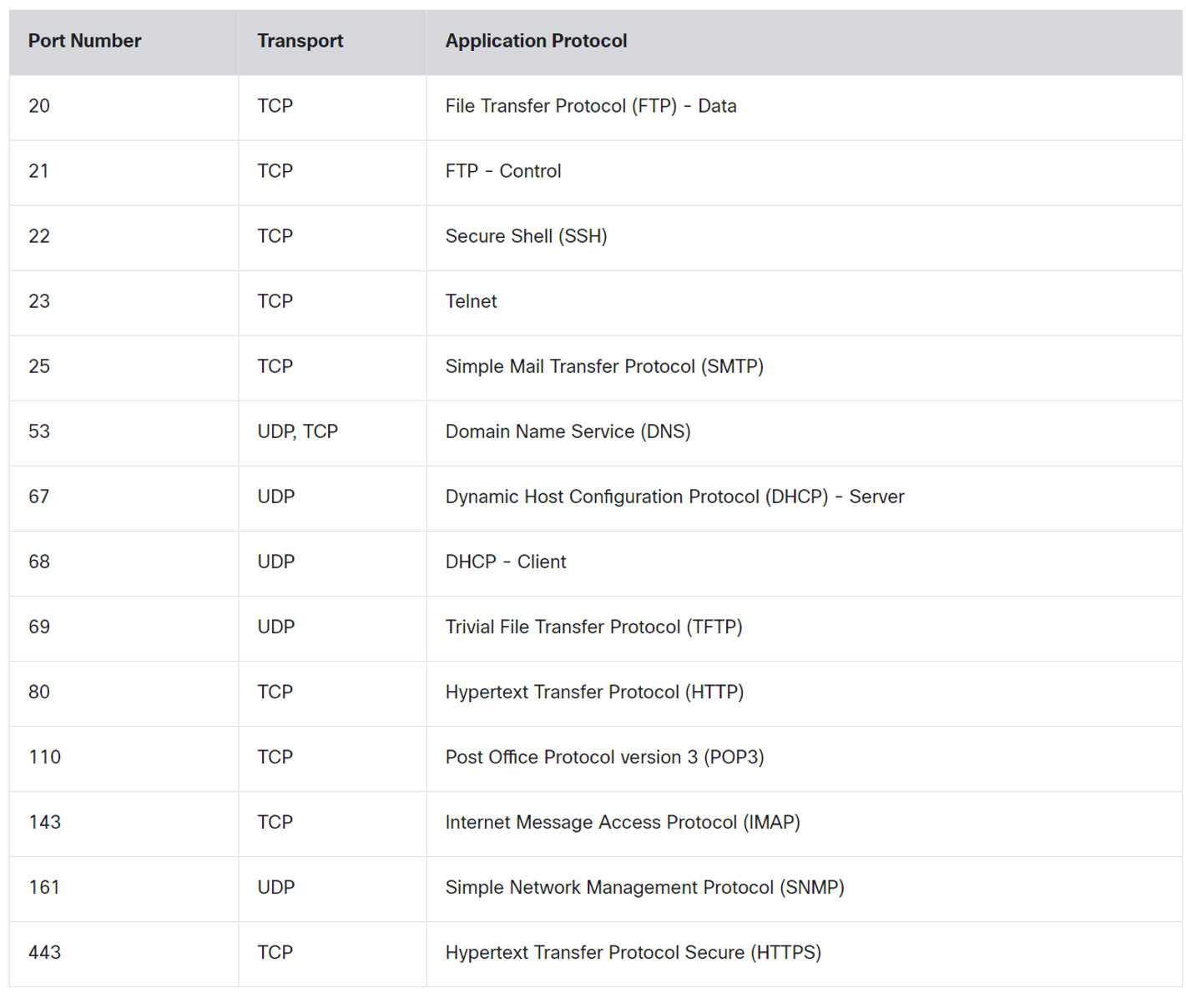
💡 DNS uses Both TCP and UDP. DNS uses UDP when clients send requests to a DNS server. However, communication between DNS servers always uses TCP.
💡 POP3: used to retrieve emails from a mail server and delete them from the mail server.
IMAP: used to retrieve emails from a mail server without deleting them on the server.SMTP: Used by an email client to send emails.
IMAP: used to retrieve emails from a mail server without deleting them on the server.
SMTP: Used by an email client to send emails.
What are registered ports?
These ports are assigned by IANA to specific software applications and services that are not as universal as Well-Known Ports but are still used widely.
- Range: 1024 – 49151
- Used by specific applications (e.g., MySQL, RDP, VoIP services).
Register port used by Both TCP / UDP
| Name | port |
| Ms SQL | 1433 |
| WAP | 2948 |
What are Dynamic Ports?
Temporary ports are used by client devices for outgoing connections.
- Range: 49152 – 65535
- Not registered with IANA; used randomly for short-lived communication.
| concept | Description |
| Same-layer interaction on different computers | The two computers use the protocol to communicate with the same layer on another computer. the protocol defines a header that communicates what each computer wants to do. |
| Adjacent(uh·jay·snt) نزیک-layer interaction on the same computer | On a single Computer, one lower layer provides a service to the layer above. |
What are two characteristics of multicast transmission?
- Multicast transmission can be used by routers to exchange routing information.
- A single packet can be sent to a group of hosts.
Which two OSI model layers have the same functionality as the two layers of the TCP/IP model?
- Network
- Transport
How are port numbers used in the TCP/IP encapsulation process?
If multiple conversations occur that are using the same service, the source port number is used to track the separate conversations.
Both UDP and TCP use port numbers to provide a unique identifier for each conversation. Source port numbers are randomly generated and are used to track different conversations. Destination port numbers identify specific services by using either a default port number for the service or a port number that is assigned manually by a system administrator.
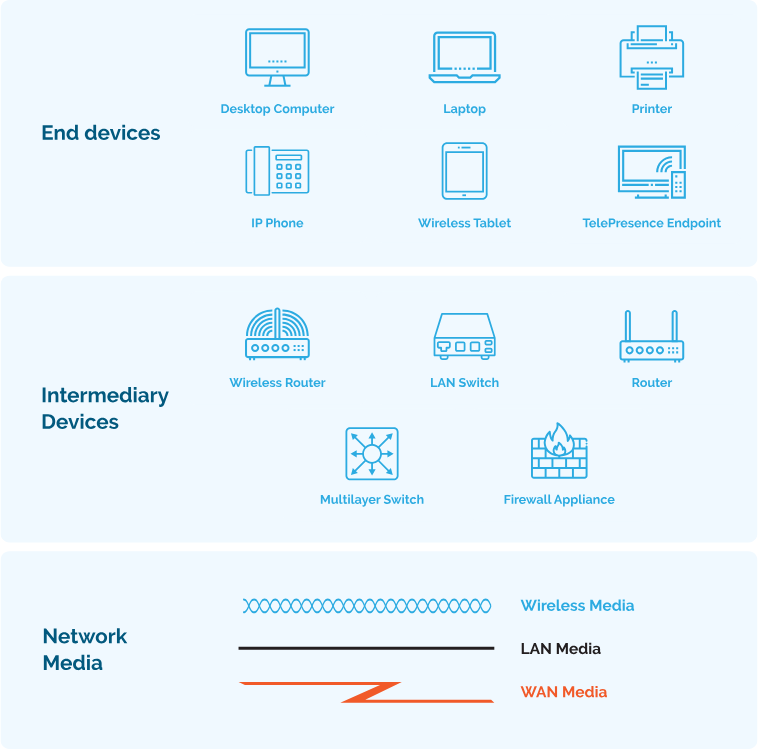
Which category of network components includes wires and cables used in a wired network?
- media
Which three elements do all communication methods have in common? (Choose three.)
- Message source.
- Message Destination.
- Message medium.
What two criteria are used to help select a network medium from various network media?
- The distance the selected medium can successfully carry a signal.
- The environment where the selected medium is to be installed.
Network Troubleshooting
A number of software utility programs are available that can help identify network problems, most of these software are provided by the operating system as a command line interface (CLI).
| IPconfig | Displays IP configuration Information on Windows Operation System. |
| IFconfig | Displays IP configuration Information on Linux Operation System. |
| Ping | Test connection to other hosts. |
| Netstat | Display network connections. |
| Tracert | Displays the route taken to the destination. |
| NSlookup | Directly queries the name server for information on a destination domain. |
ping 192.168.1.1 repeat 9999999 = ping 192.167.1.1 -t
ping -t 192.168.1.1
-t refers to continuous ping on Linux, you don’t need -t option.
ping -n 10 192.168.1.1 (windows)
ping -c 10 192.168.1.1 (Linux)
-n and -c refer to a set number of packets, by default, the number of packets is 4 echo packets.
nslookup google.com 8.8.8.8
Query a specific DNS server
nslookup 8.8.8.8
get hostname from IP
netstat -o
Display process IDs
netstat -n
-n option can be used to display IP addresses and port numbers.
netstat -p tcp
netstat -p udp
Show protocol-specific connections
netstat -aon | find "443"
Find a Process Using a Specific Port
netstat -an | find "192.168.1.1"
netstat -ano
We can use more than one option together -a -n -o
Which command can be used on a Windows host to display the routing table?
netstat -r
Which command can be used on a Windows host to display the ARP table?
arp -a
Which command can be used on a Windows host to display the routing table IPv6?
route print
Verifying Network Connectivity
Using and interpreting the output of various testing tools is often the first step in isolating the cause of a network connectivity issue. The ping command can systematically test connectivity by looking for answers to the following questions, in this order:
| Step 1. Can an end device ping itself? |
| Step 2. Can an end device ping its default gateway? |
| Step 3. Can an end device ping the destination? |
Seven-Step Troubleshooting Process
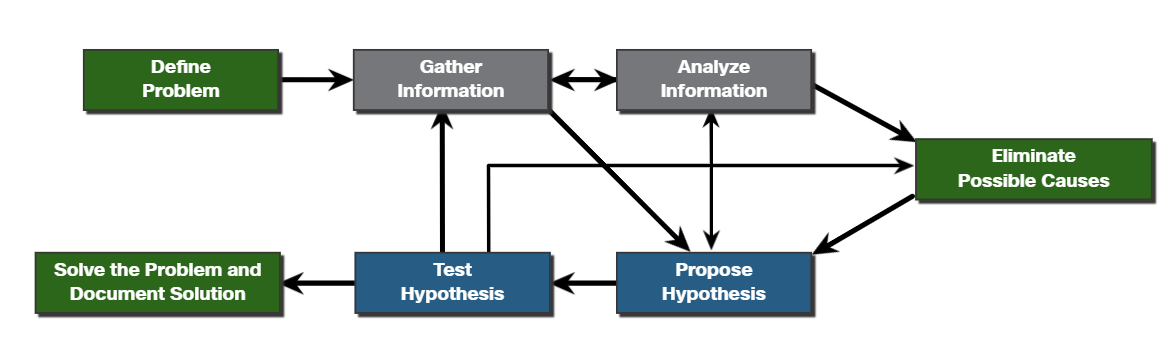
Define Problem: Define what the problem is. Problems are usually identified by a sign (e.g., the network is slow or has stopped working). Network issues may appear in many different forms, including alerts from the network management system, console messages, and user complaints. In an organization, problems are typically assigned to network technicians as trouble tickets.
Gather Information: In this step, targets (i.e., hosts, devices) to be investigated must be identified, access to the target devices must be obtained, and information gathered.
Analyze Information: Possible causes must be identified. The gathered information is interpreted and analyzed using network documentation, network baselines, searching organizational knowledge bases, searching the internet, and talking with other technicians.
Eliminate Possible Causes: If multiple causes are identified, then the list must be reduced by progressively eliminating possible causes to eventually identify the most probable cause. Troubleshooting experience is extremely valuable to quickly eliminate causes and identify the most probable cause.
Purpose Hypothesis: When the most probable cause has been identified, a solution must be formulated. At this stage, troubleshooting experience is very valuable when proposing a plan.
Test Hypothesis: Before testing the solution, it is important to assess the impact and urgency of the problem. For instance, could the solution have an adverse effect on other systems or processes? The severity of the problem should be weighed against the impact of the solution. For example, if a critical server or router must be offline for a significant amount of time, it may be better to wait until the end of the workday to implement the fix.
Solve the Problem: When the problem is solved, inform the users and anyone involved in the troubleshooting process that the problem has been resolved. Other IT team members should be informed of the solution. It is important to properly document the cause and solution as this can assist other support technicians to prevent and solve similar problems in the future.
#
Establish a Network Baseline
A baseline is used to establish normal network or system performance to determine the “personality” of a network under normal conditions.
A network baseline should answer the following questions:
- How does the network perform during a normal or average day?
- Where are the most errors occurring?
- What part of the network is most heavily used?
- What part of the network is least used?
- Which devices should be monitored and what alert thresholds should be set?
- Can the network meet the identified policies?
#
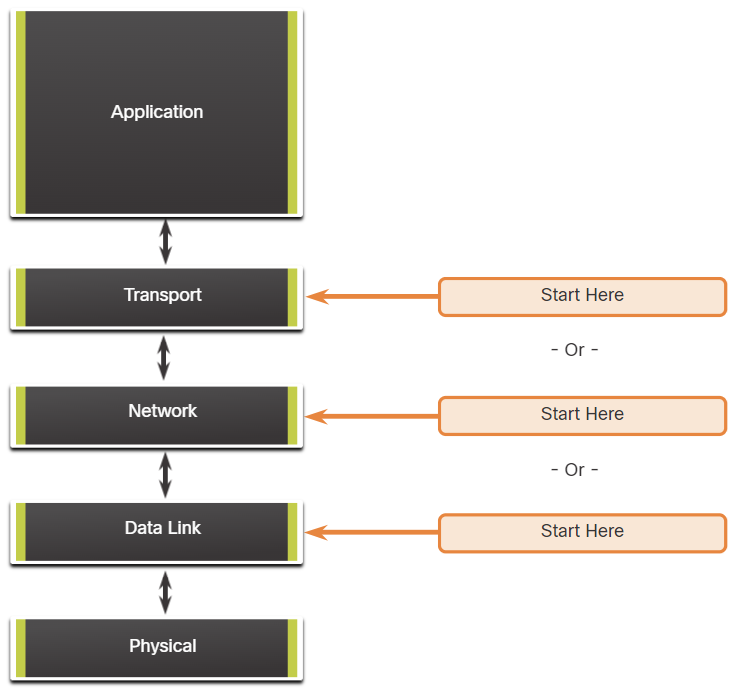
Structured Troubleshooting Methods
Bottom-Up
In bottom-up troubleshooting, you start with the physical layer and the physical components of the network.
The disadvantage of the bottom-up troubleshooting approach is that it requires that you check every device and interface on the network until the possible cause of the problem is found.
Top-Down
top-down troubleshooting starts with the end-user applications and moves down through the layers of the OSI model until the cause of the problem has been identified.
Divide-and-Conquer
The network administrator selects a layer and tests in both directions from that layer.
In divide-and-conquer troubleshooting, you start by collecting user experiences of the problem, document the symptoms and then, using that information, make an informed guess as to which OSI layer to start your investigation.
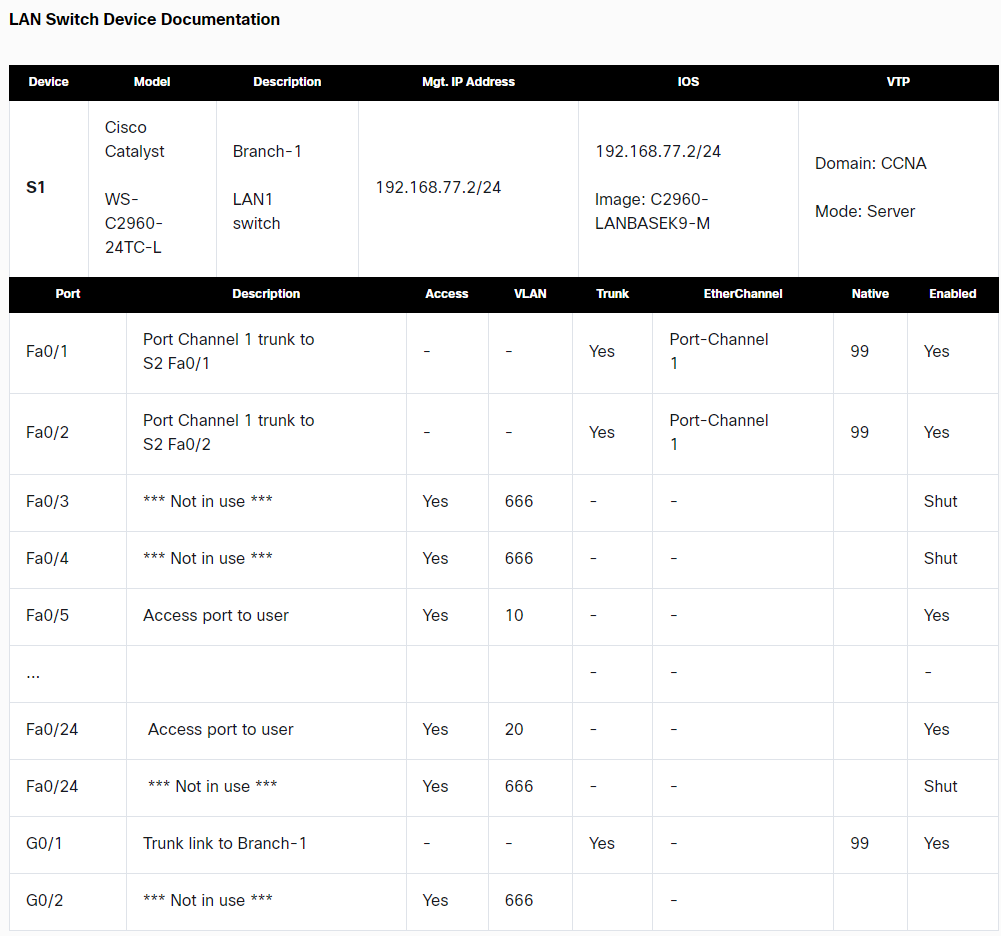
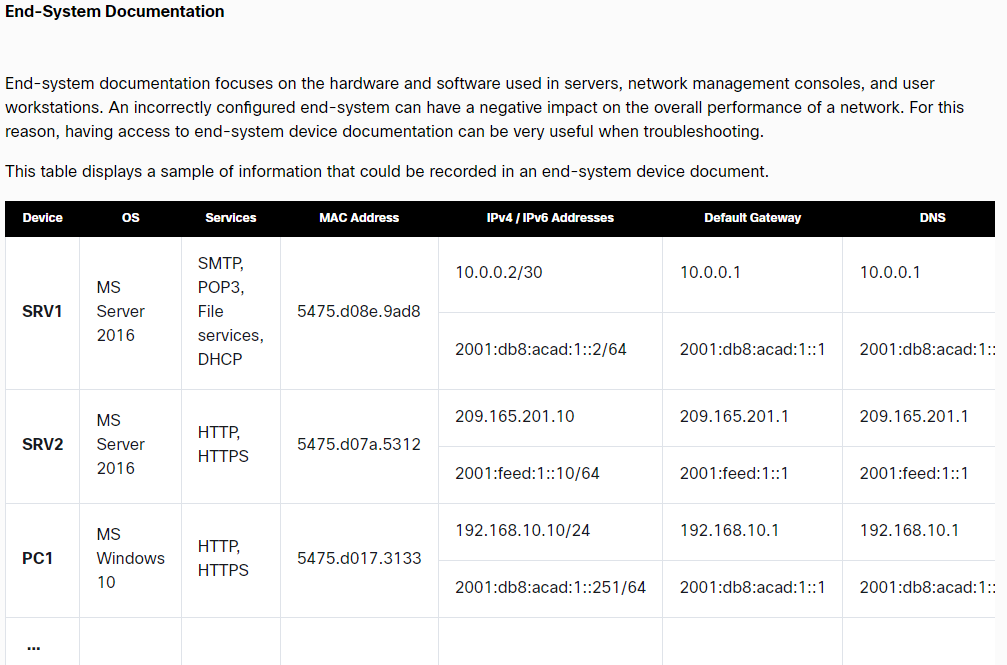
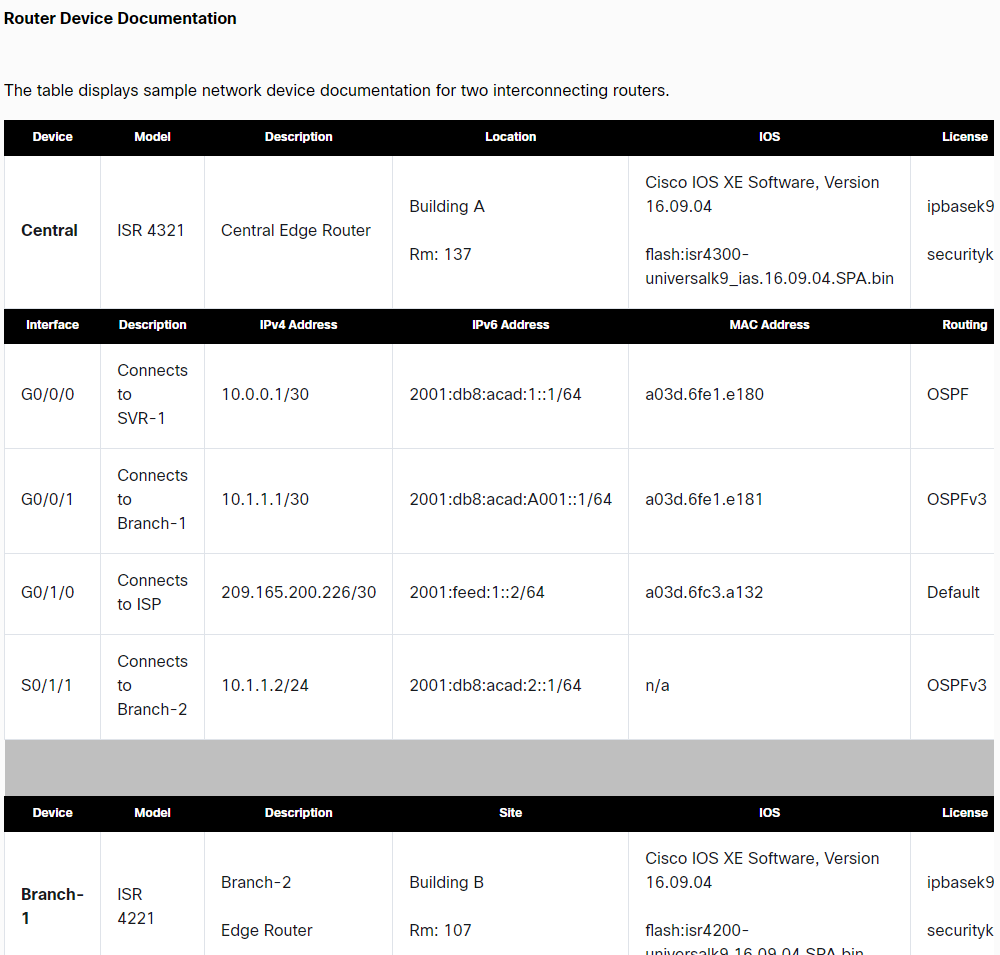
Network Device Documentation
Comments
Join the discussionNo comments yet. Be the first to comment.
